Minecraft Seed Map Accuracy: Every Number, Per Feature and Per Edition
By
Minecraft Search
|
7 min read
|
Updated on
September 8, 2026
Written with AI assistance.
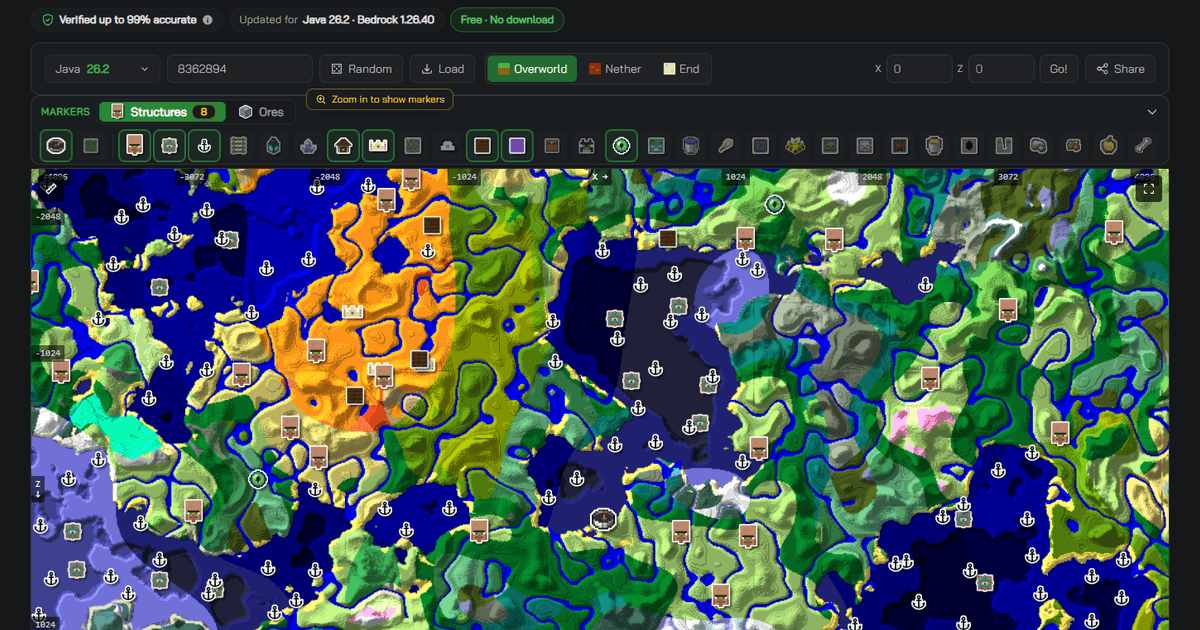
Minecraft seed map accuracy, in short
- Minecraft seed map accuracy here is published per feature and per edition — not as one blended number for the whole tool.
- Every marker type carries its own published percentage, separately for Java and Bedrock. The full table is below, and the same figure appears on the marker itself when you open it.
- Most registry structures — villages, strongholds, trial chambers, nether fortresses, bastions, end cities, ruined portals, buried treasure — sit at or near the top of the Java column.
- The harder cases are published too, not hidden: a few structures on each edition read visibly lower, and we say so on the marker.
- Where no honest number exists — cheese caves, the mega and underwater ravine variants — the marker shows an "Estimate" badge instead of a percentage, and a feature can carry a number on one edition while still reading Estimate on the other: ravines now do exactly that, with a measured Bedrock figure and an Estimate on Java.
- Every figure is stamped to Java 26.3 and Bedrock 1.26.51, and re-checked when Minecraft changes world generation.
We're not aware of another Minecraft seed map that publishes a per-feature accuracy number at all. Most tools drop a marker and let you assume it's right. We'd rather show you the number — including the unflattering ones — so you know exactly how much to trust each pin before you spend an hour walking to it.
Why one "accuracy %" for a whole tool is meaningless
A single headline number — "our map is 95% accurate!" — hides everything that matters. A village and an ancient city are found in completely different ways, and Java and Bedrock generate the world differently enough that the same structure can be near-perfect on one edition and merely good on the other.
So we don't publish one number. We publish one per feature, per edition. Here is the full table, as shipped for Minecraft Java 26.3 and Bedrock 1.26.51.
Structure and feature markers (seed map)
| Marker | Java | Bedrock |
|---|---|---|
| Village | 99% | 98% |
| Stronghold | 99% | 93% |
| Ocean Monument | 99% | 90% |
| Woodland Mansion | 99% | 99% |
| Ancient City | 97% | 99% |
| Trial Chamber | 99% | 99% |
| Nether Fortress | 99% | 99% |
| Bastion Remnant | 99% | 99% |
| End City | 99% | 99% |
| Ruined Portal | 99% | 99% |
| Buried Treasure | 99% | 99% |
| Shipwreck | 99% | 95% |
| Ocean Ruins | 99% | 97% |
| Desert Pyramid | 99% | 90% |
| Jungle Temple | 99% | 90% |
| Igloo | 99% | 87% |
| Pillager Outpost | 99% | 97% |
| Witch Hut (Swamp Hut) | 99% | 98% |
| Trail Ruins | 99% | 98% |
| Mineshaft (Java 1.13+; 99% on older) | 98% | 99% |
| Amethyst Geode | 89% | 92% |
| Ore vein — iron / copper (large) | 94% | 94% |
| Monster Spawner (dungeon) | 91% | 86% |
| Sulfur Spring | 80% | 99% |
One row in that table needs a word of explanation: the sulfur spring. Its two columns answer different questions, so don't read them against each other. On Java the number is per spring — will this exact marker be a spring. On Bedrock the number says a real sulfur cave lies below the marker, which is the claim we can stand behind there, and we publish that rather than dressing it up as the other one.
Some markers — cheese caves, the mega and underwater ravine variants — are shown as an "Estimate" badge instead of a percentage. That's deliberate: where we can't stand behind a hard number, we won't invent one. An honest "estimate" beats a made-up "97%". The badge is per edition, too: a feature we have measured on one edition keeps its Estimate on the other until that side is measured as well, rather than borrowing the number across. A figure can be scoped to a version range as well, and the row's label names it: world generation changes under a structure, so a number measured on modern versions is not one we have earned on the old ones. Pick a version inside the range and the marker shows that percentage; pick an older one and you get whatever is true there — the older generation's own measured number once we have one, and the Estimate badge until we do.
Ore finder (per ore)
The ore finder is a separate tool with its own published figures, because ore distribution is a different problem from structure placement:
| Ore | Java | Bedrock |
|---|---|---|
| Diamond | 91% | 87% |
| Ancient Debris (Netherite) | 91% | 85% |
| Iron | 94% | 85% |
| Gold | 85% | 92% |
| Redstone | 86% | 93% |
| Copper | 94% | 89% |
| Lapis Lazuli | 93% | 86% |
| Coal | 88% | — |
Each ore's own finder page carries its live figure; the numbers above are current as of the versions named above.
What the number actually means — and what it doesn't
Our accuracy figure answers one plain question: how often does a marker match what you'll actually find in the real game on that seed? It's a hit rate: the share of markers of that type that land on a real structure at the coordinates shown. Read it straight off the table above, or off the marker itself.
The figures are deliberately conservative — we'd rather under-promise and have the world beat the number than the reverse. What the figure is *not* is a guess or a marketing round-up: it's a measured quantity, and where a feature can't be measured cleanly it's marked as an estimate rather than dressed up as a percentage.
The number, not the method
We publish the number, not the method behind it. The measurement process is our own; the result — the percentage on each marker — is what we put in your hands, so you can judge each pin on its merits.
Why Java and Bedrock differ
Scan the table and you'll notice most structures read higher on Java than on Bedrock — igloos, desert pyramids and jungle temples show the gap most visibly. That gap reflects something real about the two editions: on Bedrock, whether a handful of structure types actually appear at a given spot depends more heavily on the local biome and terrain right around it, and that extra sensitivity makes those types inherently harder to pin down ahead of time. Java's placement for the same structures is far more regular.
Which features read lowest overall is a question the table answers directly — the numbers move as we re-measure, so trust the table over any ranking we could write here.
You can see it directly. Below is the same seed at the same coordinates on each edition — Java first, then Bedrock. The biomes and terrain are identical, because seeds generate the same landscape on both. The structures are not: villages, shipwrecks and ruined portals land in visibly different places.
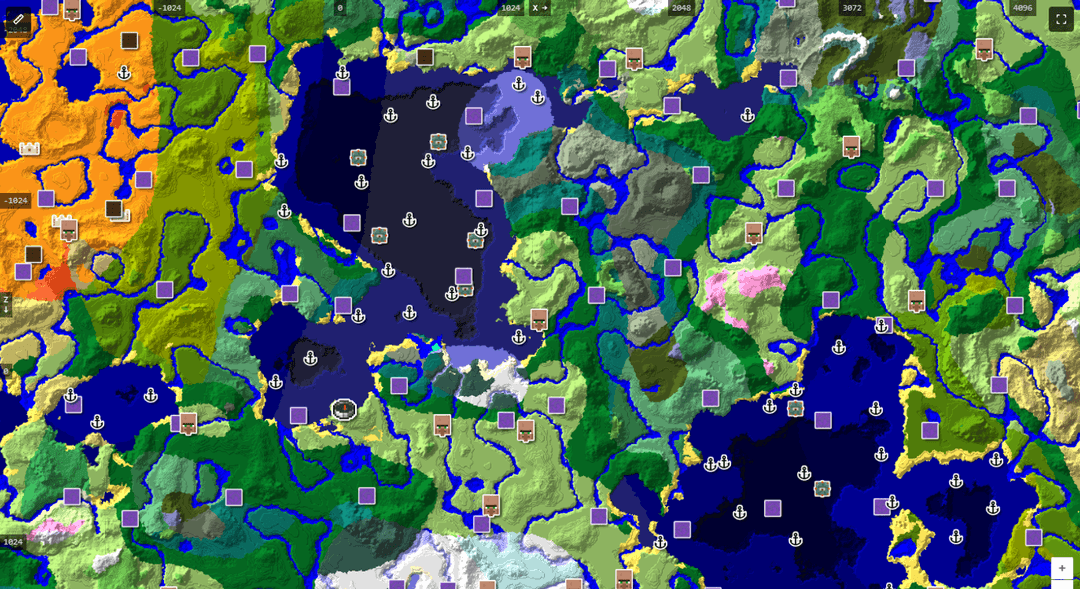
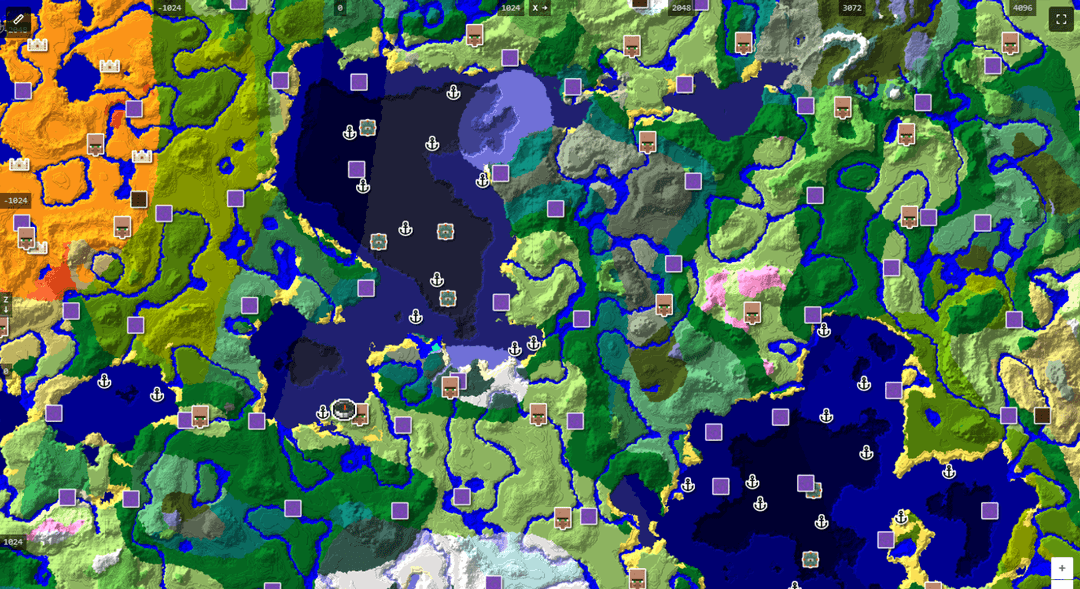
We could have hidden this behind one blended number. Publishing the split is the honest version, and it's also more useful: a desert pyramid marker on Bedrock deserves a bit more skepticism than the same marker on Java — and the number tells you exactly how much.
These numbers move with the game
Accuracy is per version. Every figure here is stamped to Java 26.3 and Bedrock 1.26.51, and we re-check them when Minecraft ships worldgen changes. A tool that was "accurate" for 1.20 and never touched again is quietly wrong the day a new version changes generation. The number on our markers is meant to be true *today*, on the version you're actually playing.
That re-checking cuts both ways. When a figure improves we raise it, and when a closer look says we were over-claiming we lower it — the igloo's Bedrock figure has been corrected downward rather than left comfortable. A number that can only ever go up isn't a measurement.
Open any seed and see the figure on the marker itself — every structure popup shows its own accuracy percentage, or an honest "Estimate" badge, for the edition and version you picked.
Open the seed map →Cite this
Writers, wiki editors and other tool authors are welcome to reference these figures. Please cite them with the version and date so readers know they're current, e.g.:
MinecraftSearch seed map — per-feature accuracy figures published for Java 26.3 and Bedrock 1.26.51, retrieved 2026. [quote the specific percentage from the table for the feature you're citing]
If you want a specific feature's number for an article, it's on that feature's finder page and on the marker itself in the map. New to seed maps generally? Start with how to use a seed map — and if you don't have your world's seed yet, here's how to find it.
Frequently asked questions
Q: Is the MinecraftSearch seed map 100% accurate?
A: No, and we don't claim it is. The table above is the honest answer: most registry structures read highest on Java, other features sit lower, and each one publishes its own figure rather than hiding behind the best case. Anything we can't put an honest number on shows an "Estimate" badge instead.
Q: Why is Bedrock accuracy lower than Java for some structures?
A: On Bedrock, whether certain structure types actually appear at a given spot depends more heavily on the local biome and terrain around it, which makes them inherently harder to predict in advance. Java's placement for the same structures is far more regular. Igloos, desert pyramids and jungle temples show the gap most clearly — compare their two columns in the table above.
Q: What does the "Estimate" badge mean?
A: It means we don't publish a percentage for that feature because we can't stand behind one. Cheese caves show it, as do the mega and underwater ravine variants, and a feature can show it on one edition while carrying a number on the other — ordinary ravines are measured on Bedrock but still an Estimate on Java. The marker is still useful as a strong hint about where to look — it just isn't backed by a number, and we'd rather say so than invent one.
Q: Do these accuracy figures change when Minecraft updates?
A: Yes. Accuracy is per version, and every figure is stamped to the version it was checked against — currently Java 26.3 and Bedrock 1.26.51. When Minecraft changes world generation we re-check, and figures move in both directions: the igloo's Bedrock number has been corrected downward, not just upward.
Q: Can I cite these numbers in an article or a wiki entry?
A: Yes, please do — that's what they're published for. Include the edition and version so readers can tell whether the figure is still current, and link the feature's own page if you're quoting a single number. The suggested citation format is in the "Cite this" section above.
Q: Do other Minecraft seed maps publish accuracy figures?
A: Not that we've found. We checked the major alternatives and none of them states a per-feature reliability number — markers appear with no indication of how much to trust them. If that changes we'll happily update this line.